---
title: How we automated feature-flag cleanup with Agentic Pipelines
source: Atlassian Engineering
source_slug: atlassian
url: https://www.atlassian.com/blog/bitbucket/how-we-automated-ff-cleanup-with-agentic-pipelines
published: 2026-09-24
fetched: 2026-09-24T14:41:57+00:00
ingested: true
---
The hard part of a feature flag is rarely adding it. It is remembering to remove it months later, when the rollout is over, the original context has faded, and there is always a more urgent piece of work waiting.
Since April 2026, one Atlassian team has used Agentic Pipelines to clean up their monthly backlog of stale feature flags. The workflow prepares the change and opens a pull request, while engineers still review and merge the pull request.
Here’s how we used Agentic Pipelines to automate feature-flag removal when it was safe.
## Why cleanup tickets keep slipping
Within Atlassian, we have a feature flag gating system and there is a ticket for tracking every feature flag we create. Stale feature flags reach engineering teams as auto-created tickets in an internal Jira project. Each ticket carries all the info we need about it: the flag name, its final value, the flag type, the gate’s current state.
Feature flags are created intentionally but are often forgotten after rollout. A few stale flags are manageable. A growing backlog creates confusion. Engineers have to reason around those flags whenever they touch the surrounding code.
The cleanup itself is straightforward. Find every place the flag is used across the codebase, inline the final behavior, remove the dead branch, clean up any related definitions, run the tests, open a pull request. Most teams already have this written down somewhere.
The problem is that the work requires codebase-specific knowledge that isn’t easy to automate with a script and it competes with everything else on the backlog.
## The workflow: find the work, then prepare the PR
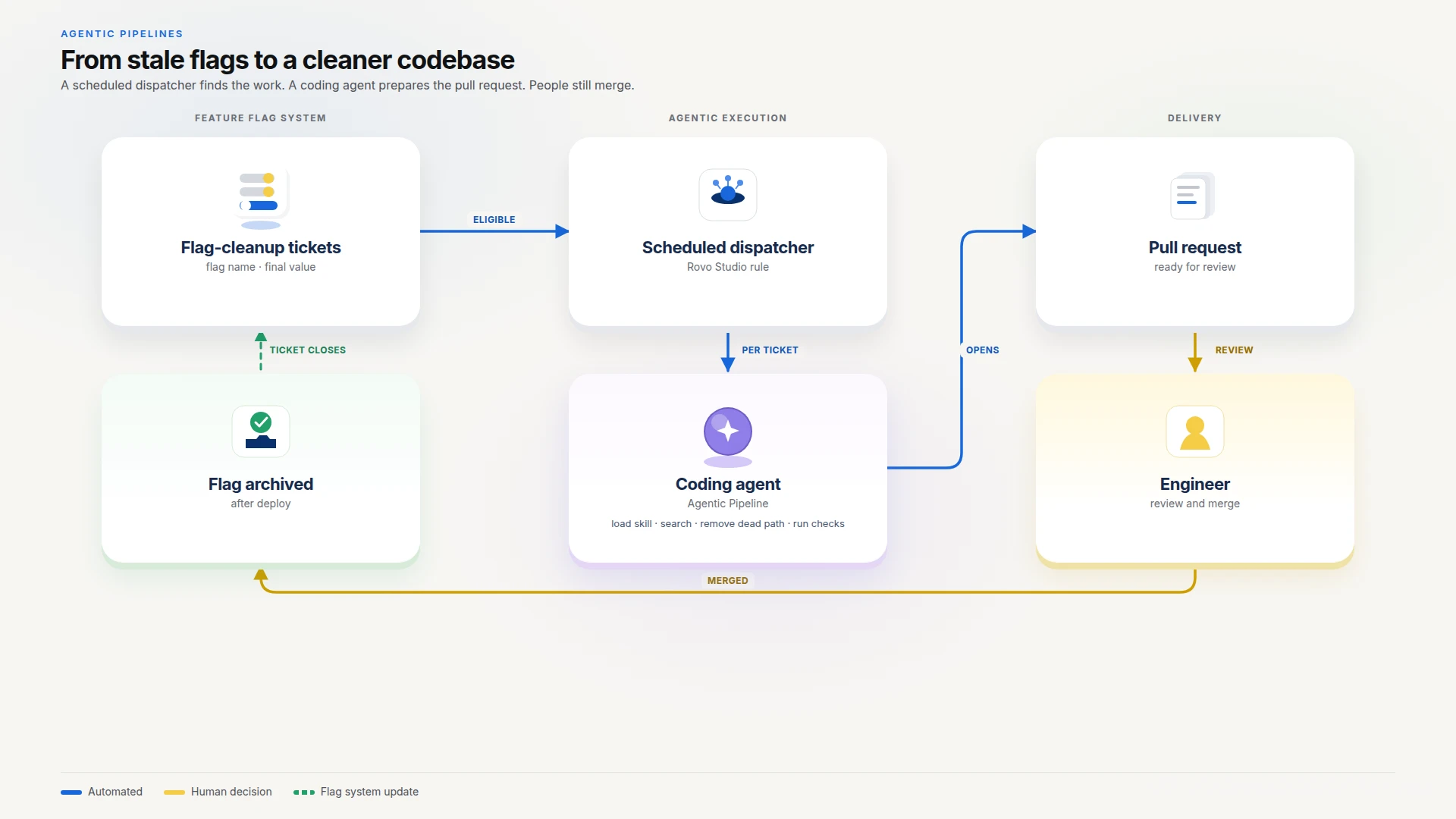From stale flags to a cleaner codebase
The automation has two parts: a dispatcher that finds the work, and a coding agent that does it.
Rovo Studio automation rule (scheduled)
→ queries Jira for stale flag-cleanup tickets ready for code removal
→ for each ticket: triggers a coding-agent pipeline run (ticket key passed as context)
→ agent reads ticket metadata (flag name, final value)
→ loads the flag-cleanup skill
→ searches the codebase — verifies current state before touching anything
→ inlines the final behavior, removes the dead code path
→ runs linters, type-checks, and tests
→ opens a pull request
→ comments on the ticket with the PR link and labels it as automated
→ engineer reviews and merges the PR
→ flag is archived in the team's flag service post-deploy → ticket closes automatically
### Finding the work automatically
A scheduled [Rovo Studio](https://support.atlassian.com/studio/docs/what-is-rovo-studio/) Automation rule queries Jira for open flag-cleanup tickets that are stale and eligible for automated code removal. For each one it finds, it triggers the coding agent as a Bitbucket Pipelines run, passing the ticket key in as context.
The dispatcher removes the repeated work of finding stale flags and starting cleanup runs manually. We don’t have to go hunting for stale flags. Nobody has to remember to invoke anything: the work finds the agent. The dispatcher fans out across however many eligible tickets exist and runs agents in parallel.
### What we let the agent do
We kept the prompt deliberately thin because we did not want flag-cleanup knowledge scattered across pipeline configuration and prompt text. The pipeline reads the ticket from the context it was passed, loads a flag-cleanup skill, executes it, and reports a one-line result back. Almost none of the domain logic lives in the prompt itself. Everything lives in the skill.
The agent is not asked to guess how to remove a flag. It receives a ticket key, reads the structured cleanup context, and then verifies the current codebase before changing anything. For a fully rolled-out flag, it keeps the enabled behavior, removes the obsolete branch and gate definition, updates affected tests, and runs the repository’s required checks. If the ticket and codebase disagree, or if the change cannot pass validation safely, it stops and reports the reason.
Checks have to pass before a pull request opens. If checks fail, the workflow is instructed to investigate and repair issues within its defined scope. If it cannot safely produce a passing change, it stops and reports the result rather than opening a PR that has failed validation. Once the PR is open, the agent comments on the ticket with the link and labels it so every automated cleanup stays queryable later.
We configure repositories with branch restrictions and policies to prevent agents from pushing directly to main. Token scopes and permissions grant only the access each task requires.
A simplified pipeline looks like this:
# bitbucket-pipelines.yml (excerpt)
definitions:
agents:
flag-cleanup:
prompt: ".claude/flag-cleanup-agent.md"
config:
path: .claude/pipeline-config.yml
pipelines:
custom:
flag-cleanup:
- step:
name: Remove flag and open pull request
auth:
system:
scopes:
- read:repository:bitbucket
- write:repository:bitbucket
- write:pullrequest:bitbucket
script:
- agent: flag-cleanup
### Why the skill matters more than the prompt
The skill is the part we keep rewriting. It encodes how flags actually work in a specific codebase: where they’re registered, how they’re consumed across frontend and backend, and what to do with each usage pattern, including conditionals, ternaries, and variable assignments.
One of the first things we learned was that repositories move fast and devs frequently adjancent code, the rep state can diverge from the initial rollout plan. Sometimes the flag had already been removed; sometimes its final value had changed. That is why verification became the first step in the workflow, not an optional safeguard.
A shortened version of the skill looks like this:
# Feature-flag cleanup
Read the ticket for flag name and final value. Search the repo for both
before editing. If nothing is found, stop — the flag may already be gone.
Keep the branch that matches the final value. Delete the other path,
the flag helper, and unused imports. Do this at each call site; the
pattern is often not uniform.
{isEnabled() ? : } →
if (checkGate("flag")) next() else old() → next()
Update tests that mocked the discarded value. Run the repo\'s lint,
type-check, and tests. No passing checks, no pull request.
If the final value is false, or the surviving branch is unclear, stop
and ask. Archive the flag in the flag service after merge, not here.
The more useful change is that the knowledge required to clean up a flag is now written down. It lives in a skill file that is versioned and reviewable, rather than sitting in a how-to doc or in someone’s head. When the patterns in the codebase change, the skill gets updated, and the next run uses the new version.
## What changed after we put this into use
The goal was not to remove engineers from the process. It was to remove the repetitive start-up work: finding eligible tickets, reconstructing a flag’s history, locating every usage, and preparing the first safe change. Engineers still make the final call in pull-request review.
Since April 2026, one Atlassian team has used this workflow to clean up their monthly backlog of stale feature flags each month. Each change is generated by an Agentic Pipeline and goes through the team’s standard pull-request review and merge process. There are variations to this in other teams based on their code base structure and rollout rules.
This pattern works best for maintenance work with reliable ticket context, a bounded code change, and clear validation. Feature-flag cleanup met those conditions for us. Other teams may find the same pattern useful for dependency updates, documentation fixes, or remediation work.
## Lessons you can apply
**Verify before changing code.** A cleanup ticket is useful context, not proof that the codebase is unchanged. Search for the flag and confirm its final state before making edits.
**Keep the prompt thin and the skill rich.** The agent prompt should be a small harness that loads a skill and reports back, not a second place where domain knowledge lives. That way the same skill works whether it’s triggered by the pipeline or run interactively by a developer.
**Let checks gate the pull request, not skip past failures.** If linting, type checking, or tests fail, the agent should investigate and repair issues within its defined scope. If it cannot safely produce a passing change, it should stop and report the result rather than open a broken pull request.
**Scope permissions to the task.** The agent only needs to read and write the specific ticket system and open pull requests. Task-specific auth tokens limit the damage if a run goes wrong.
**Treat the skill as a living document.** Codebase conventions drift. A skill that isn’t revisited after real runs will eventually miss an edge case that a developer would have caught by eye.
## Try it yourself
This pattern is not limited to feature flags. It suits recurring maintenance work with a clear trigger, bounded steps, reliable context, and an unambiguous definition of done.
Similar patterns are discussed in how we used agentic pipelines to do [vulnerability fixes](https://www.atlassian.com/blog/bitbucket/vulnerability-fixes-with-agentic-pipelines) and [documentation](https://www.atlassian.com/blog/development/agentic-pipelines-to-swarm-documentation).
Agentic Pipelines is in beta for Bitbucket Cloud. You’ll need to enable it for your workspace, and your chosen model provider has its own requirements. Check the current documentation for plan, provider, credential, permission, and data-handling details before you enable anything that can write to a repository.